10 Claude Workflows You Can Set Up Today (Claude Code, Cowork and Skills)
Quick answer: A Claude workflow is a repeatable job that Claude does the same way every time, using a saved method (a skill), the right tools and a clear check at the end.
The ten below cover coding, review, research, documents, data, security and marketing, and each takes under an hour to set up.
A one-off prompt gets you one answer. A workflow gets you the same quality of answer every time, because the method is saved instead of retyped.
This guide gives you ten workflows to copy, with the skills, steps and prompts for each.
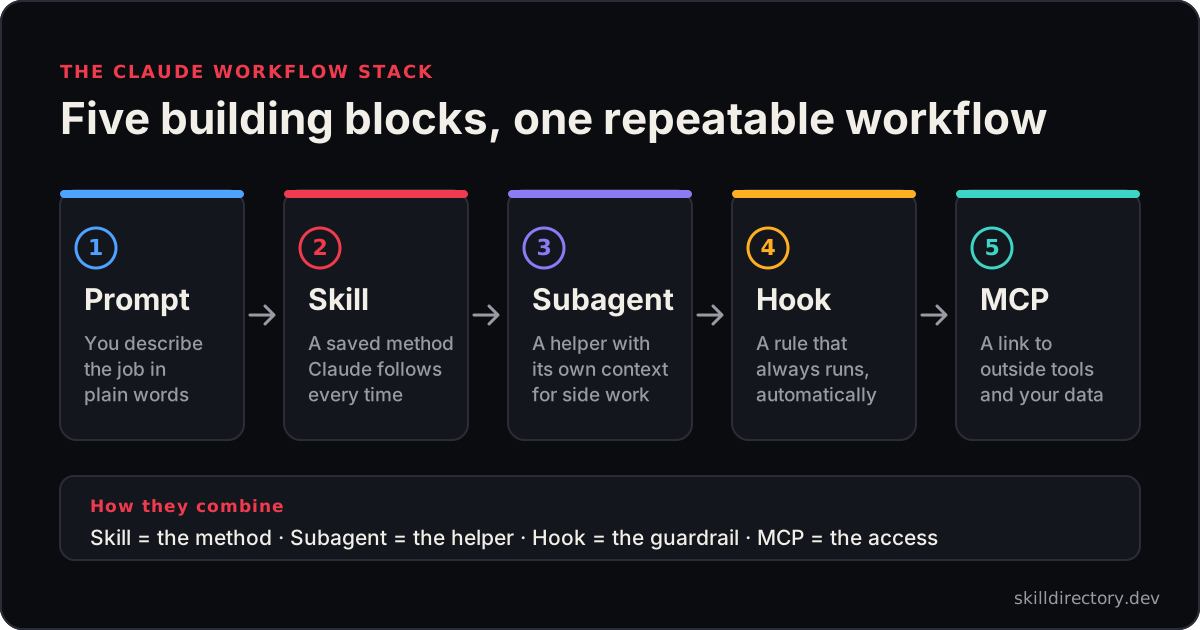
What a Claude workflow is made of
Every workflow below combines a few of the same parts.
- Prompt: you describe the job in plain words.
- Skill: a saved method Claude follows. Learn more in what Claude skills are.
- Subagent: a helper with its own context, used for side work in Claude Code.
- Hook: a rule that runs automatically, such as formatting after an edit.
- MCP: a link to outside tools and data. See Claude skills vs MCP.
Claude Code can use all five. Claude Cowork works with files in folders you choose, plus connectors, skills and plugins, so it suits office-style workflows.
The 10 Claude workflows at a glance
| # | Workflow | Where it runs | Key skills |
|---|---|---|---|
| 1 | Spec-to-ship coding loop | Claude Code | To Spec, TDD, Verification Before Completion |
| 2 | Pull request review | Claude Code | Code Review, API Design Reviewer |
| 3 | Auto-format every edit | Claude Code | A hook, no skill needed |
| 4 | Weekly report from a folder | Cowork | A custom skill, Docx |
| 5 | SEO content pipeline | Claude Code or Cowork | SEO Audit, Copywriting, AEO |
| 6 | Research brief with citations | Cowork or Claude.ai | Paper Lookup, Deep Research |
| 7 | Documents to Markdown to summary | Claude Code or Cowork | MarkItDown |
| 8 | Spreadsheet analysis | Cowork or Claude Code | Statistical Analyst |
| 9 | Security audit | Claude Code | Cloudflare Security Audit |
| 10 | Release notes | Claude Code | Changelog Automation |
The 10 Claude workflows
1. Spec-to-ship coding loop
Goal: go from a design discussion to verified code without skipping steps.
Skills: To Spec, TDD and Verification Before Completion.
- Install the three skills in your project.
- Discuss the feature with Claude until the design is clear.
- Paste the prompt below.
We have agreed the design for the export feature.
Write the spec, then build it test-first,
and verify everything passes before you say it is done.
Heads-up: skills for the same job can overlap, so install one TDD skill, not two. See our guide to developer agent skills.
2. Pull request review
Goal: review a branch against your standards and the issue it was meant to solve.
Skills: Code Review, and API Design Reviewer for endpoint changes.
- Write your coding standards down in the repository.
- Link the issue or spec the branch came from.
- Ask for the review.
Review everything since main.
Check it against our documented standards
and against the requirements in issue 123.
Heads-up: it needs written standards and a spec to compare against, and it uses sub-agents.
3. Auto-format every edit
Goal: keep code tidy without asking each time.
This workflow uses a hook, a rule that runs automatically when something happens. Anthropic's plugin documentation shows hooks that fire when Claude writes or edits a file.
- Write a small script, such as
./scripts/format.sh, that runs your formatter. - Add a hook in your project settings that runs it after file edits.
{
  "hooks": {
    "PostToolUse": [
      {
        "matcher": "Write|Edit",
        "hooks": [{ "type": "command", "command": "./scripts/format.sh" }]
      }
    ]
  }
}
Heads-up: hooks run commands automatically with your permissions, so test the script first and check Anthropic's documentation for the current field names.
4. Weekly report from a folder
Goal: turn this week's files into a report in the same format every week.
Where: Claude Cowork, which works with files in folders you choose.
- Put the week's exports and notes in one folder.
- Save your report format as a skill. Follow how to create Claude skills.
- Ask for the report.
Using the files in this folder, write this week's report
in our standard format. List anything you could not verify.
Skills: your own report skill, plus Docx if you need a Word file.
Heads-up: share only the folder the task needs, and check the numbers before the report goes out. See what Claude Cowork is.
5. SEO content pipeline
Goal: audit a site, then plan and write content that follows what you find.
Skills: SEO Audit, Copywriting, AEO and Avoid AI Writing.
- Run the audit and keep the priority list.
- Pick one finding and ask for a draft.
- Check the draft with the writing skill before you publish.
Audit this page for SEO issues and list them by priority.
Then rewrite the headline and intro to fix the top issue.
Heads-up: confirm key findings in Search Console, and edit for your brand voice.
6. Research brief with citations
Goal: a short, sourced brief on a topic.
Skills: Paper Lookup for scholarly sources, and Deep Research for wider topics.
- State the question and what the brief is for.
- Ask for sources first, then the summary.
Find the five most relevant sources on this question.
Summarise each in two lines with its citation,
then write a one-paragraph conclusion.
Heads-up: open the sources and verify the quotes. Deep Research needs access to Google's Gemini service.
7. Documents to Markdown to summary
Goal: make a pile of PDFs and Office files searchable and summarisable.
Skills: MarkItDown, or Convert PDF to Markdown.
- Put the files in a folder.
- Convert them to Markdown.
- Ask for a summary of each, then a combined one.
Convert every file in this folder to Markdown,
then give me a three-line summary of each.
Heads-up: scanned documents may need text recognition, and you should be careful with files from untrusted sources.
8. Spreadsheet analysis
Goal: know whether a difference in your data is real.
Skill: Statistical Analyst, which covers significance tests, confidence intervals and sample size for A/B results.
- Export the raw counts, not only percentages.
- Ask for the analysis.
Here are the visitor and conversion counts for variants A and B.
Is the difference real, and how long should the test have run?
Heads-up: statistics cannot rescue a badly designed experiment, so check the setup too.
9. Security audit
Goal: a structured review of a codebase you are authorised to test.
Skill: Cloudflare Security Audit.
- Work on a clean copy of the repository.
- Set up a sandbox for any code the audit runs.
- Ask for the audit.
security audit this codebaseHeads-up: read our guide on AI agent security audits first, because this skill can run code and launches many agents.
10. Release notes
Goal: release notes from your commit history in a consistent format.
Skills: Changelog Automation and Git Advanced Workflows.
- Agree a commit message convention.
- Ask for notes since the last tag.
Write release notes for everything since the last tag
in Keep a Changelog format.
Heads-up: the notes are only as clear as your commit messages, so review them before you publish.
How to build your own workflow
You do not need a library of skills to start.
- Pick a job you repeat. Choose one that happens weekly or more.
- Do it by hand once. Write down the steps in order.
- Turn the steps into a skill. Use our guide on how to create Claude skills.
- Add a guardrail. A hook can enforce a rule, and a subagent can handle side work.
- Test and refine. Run it on a real task and fix what goes wrong.
Common mistakes
| Mistake | Fix |
|---|---|
| Using many overlapping skills | Start with one skill per job |
| A vague skill description | Say what it does and when to use it |
| No check at the end | Add a verification step before "done" |
| Sharing too much access | Grant only the files and tools the job needs |
| Trusting output blindly | Review numbers, quotes and code |
Install and safety basics
All of these skills use the standard SKILL.md format. Our guides cover how to install an agent skill and how to use Claude skills.
Read any skill before you install it, using our safety checklist. Browse more in the skill library and the best Claude skills.
Frequently asked questions
What is a Claude workflow?
A repeatable job that Claude does the same way every time. It combines a saved method, the right tools and a check at the end.
Do I need Claude Code to build workflows?
No. Claude Code is the most flexible, but Claude Cowork and Claude.ai can run skill-based workflows too. Hooks and subagents are specific to Claude Code.
Can I build a workflow without coding?
Yes. Most skills are plain Markdown instructions. Only hooks and scripts need a little technical setup.
What is the difference between a workflow and a skill?
A skill is one saved method. A workflow is the whole job, which can use several skills, tools and checks together.
Are these skills free?
Yes. Every skill linked here is open source under an MIT or Apache-2.0 licence. You still pay for the Claude usage they consume.
Related guides
- Claude Code subagents vs skills vs hooks vs plugins: What each extension point does and when to use it.
- 25 Claude skills examples you can copy: Real skill descriptions and six patterns to reuse.
Methodology and disclosure
We built these workflows from Anthropic's published documentation on skills, hooks and plugins, and from the skills in the SkillDirectory catalog, checked in November 2026. Features change, so confirm details in Anthropic's documentation.
We have not run every workflow end to end, we have no affiliation with Anthropic, and this article contains no affiliate links.