Claude Code Subagents vs Skills vs Hooks vs Commands vs Plugins (2026)
Quick answer: Use a command for a prompt you retype, a skill for a method Claude should apply, a subagent for isolated or parallel work, a hook for a rule that must always run, and a plugin to share the rest.
They are not rivals, and the best setups combine them.
Claude Code can be extended in five ways, and the names overlap enough to confuse everyone. Anthropic's documentation lists custom slash commands, skills, subagents, hooks and plugins as separate mechanisms.
This guide shows what each one is, where it lives and when to choose it.
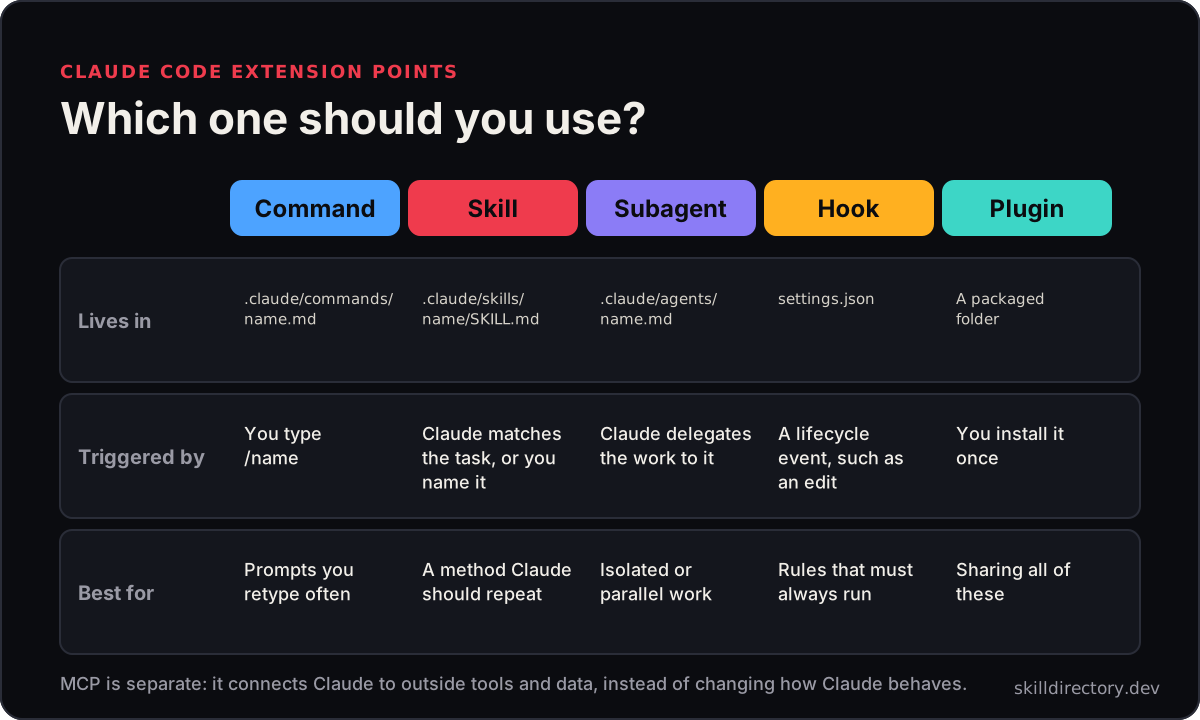
The five extension points at a glance
| Where it lives | Triggered by | Best for | |
|---|---|---|---|
| Command | .claude/commands/name.md | You type /name | Prompts you retype |
| Skill | .claude/skills/name/SKILL.md | Claude matches the task, or you name it | A method to repeat |
| Subagent | .claude/agents/name.md | Claude delegates the work | Isolated or parallel work |
| Hook | Your settings file | A lifecycle event, such as an edit | Rules that must always run |
| Plugin | A packaged folder | You install it | Sharing all of these |
Locations and field names change between versions, so confirm details in Anthropic's documentation.
Slash commands
A custom command is a Markdown file that becomes a /name shortcut. Claude Code finds files in the commands folder automatically.
Use one when you keep typing the same instruction.
---
description: Review the staged changes
---
Review the staged changes for bugs and style problems.
Focus on: $ARGUMENTS
Choose a command when: you want a manual shortcut that only runs when you ask.
Skills
A skill is a folder with a SKILL.md file that teaches Claude a repeatable method. Claude reads each skill's description and loads the full instructions only when your request matches.
---
name: code-review
description: Review the changes since a fixed point, such as a commit or branch.
---
Skills can bundle extra files, such as references and scripts. Anthropic's plugin documentation notes that skills create /name shortcuts that you or Claude can invoke, so the line between commands and skills is blurring.
Choose a skill when: you want Claude to apply a method automatically, and to load it only when needed. Learn more in what Claude skills are.
Subagents
A subagent is a specialised helper that works in its own context. Claude Code ships with three built-in subagents: Explore for read-only code search, Plan for research during plan mode, and a general-purpose agent for complex tasks.
You can also define your own as a Markdown file with a short settings block.
---
name: code-reviewer
description: Reviews code after changes. Use after edits.
tools: Read, Grep, Glob
---
You are a careful reviewer. Check the changes for bugs,
security problems and unclear code, and report what you find.
Because a subagent has its own context, it keeps long searches and side tasks out of your main conversation.
Choose a subagent when: a task is self-contained, noisy or can run in parallel.
Hooks
A hook is an event handler that runs automatically. It can respond to events in Claude Code, such as Claude writing or editing a file.
{
  "hooks": {
    "PostToolUse": [
      {
        "matcher": "Write|Edit",
        "hooks": [{ "type": "command", "command": "./scripts/format.sh" }]
      }
    ]
  }
}
Unlike a prompt, a hook does not depend on Claude remembering to do something. It runs every time the event fires, which makes it the right tool for rules.
Choose a hook when: something must happen every time, such as formatting or a safety check. Hooks run commands with your permissions, so test them first.
Plugins
A plugin is a package that can bundle commands, skills, subagents, hooks and MCP servers. Anthropic's documentation describes the components as separate folders in the plugin root, with hooks in a hooks.json file.
The point of a plugin is sharing. Instead of each teammate setting up the same pieces, they install one package.
Choose a plugin when: you want to distribute a working setup to your team or to others.
Where MCP fits
MCP is separate from all five. It connects Claude to outside tools and data, instead of changing how Claude behaves.
A plugin can include MCP servers, and a skill can tell Claude how to use one well. Read the full comparison in Claude skills vs MCP.
Which one should you use?
Ask what you need.
- "I keep typing this prompt." A command.
- "Claude should follow this method whenever the task comes up." A skill.
- "This job is big or noisy, and I want it out of my main chat." A subagent.
- "This must happen every time, no exceptions." A hook.
- "My team needs the same setup." A plugin.
- "Claude needs live access to a service." MCP.
A worked example: a code review setup
The pieces work together. This setup is our suggestion, not a required recipe.
| Piece | Job |
|---|---|
| A skill | Defines how a review should be done, such as Code Review |
| A subagent | Runs the review in its own context so your chat stays clean |
| A command | Starts it with /review |
| A hook | Formats or checks files after every edit |
| A plugin | Packages all of this for your team |
For the review skill, see our guide to developer agent skills.
Common mistakes
- Using a hook for judgement. Hooks are for fixed rules, not for decisions that need reasoning.
- Writing a skill for a one-line prompt. A command is simpler.
- Giving a subagent too many tools. Limit it to what the job needs.
- Packaging too early. Get the setup working for you before you share it.
- Installing everything. More extensions add more text for Claude to read.
Do these work in Codex and Cursor?
Skills use a standard SKILL.md format that Codex and Cursor also read. Subagents, hooks and plugins vary by tool, so check each tool's documentation.
See our guides to Codex skills and Cursor skills.
Start here
You do not need all five on day one.
- Turn one repeated prompt into a command.
- Turn one repeated method into a skill. Follow how to create Claude skills.
- Add a hook only when you find a rule you keep forgetting.
For ready-made ideas, see 10 Claude workflows you can set up today. Review anything you install with our safety checklist.
Frequently asked questions
What is a Claude Code subagent?
It is a specialised helper that works in its own context. Claude delegates self-contained or parallel tasks to it, which keeps your main conversation clean.
What is the difference between a skill and a subagent?
A skill is a method Claude follows in the current conversation. A subagent is a separate helper that does a job in its own context and reports back.
What is the difference between a skill and a slash command?
A command runs when you type it. A skill can also load automatically when your request matches its description.
What are Claude Code hooks used for?
They run commands automatically when events happen, such as after a file edit. They suit rules that must always run, like formatting.
What is a Claude Code plugin?
A package that can bundle commands, skills, subagents, hooks and MCP servers. It makes a setup easy to install and share.
Related guides
- 25 Claude skills examples you can copy: Real skill descriptions and six patterns to reuse.
Methodology and disclosure
This guide draws on Anthropic's published Claude Code documentation on plugins, subagents, hooks and skills, plus independent overviews, checked in November 2026. File formats and field names change between versions, so verify details before you rely on them.
We have no affiliation with Anthropic, and this article contains no affiliate links.